Braille and voting: why accessible ballots are mostly audio, not braille
How US voting accessibility changed after HAVA, why audio-first systems became the standard, and where blind and deaf-blind voters still face barriers to independent voting.
Before 2002, a blind voter in the United States had exactly 1 way to cast a ballot, tell a sighted person, often a stranger working the polls, who to vote for, and trust that person to mark it correctly. The Voting Rights Act of 1965 had already established a right to receive that kind of assistance, but a right to assistance isn’t the same thing as a right to privacy, and it left the actual act of voting dependent on disclosing a choice most people consider nobody else’s business. That changed with a specific federal law, and what it actually built to fix the problem looks less like braille and more like a talking, button-based machine.
HAVA came out of a broken election, not a request for braille
The Help America Vote Act was signed into law on October 29, 2002, and its immediate cause had nothing to do with disability rights on its own. It was a direct response to the mechanical-lever and punch-card voting machine failures that made the 2000 presidential election a national embarrassment. Advocacy from the National Federation of the Blind pushed disability access into the resulting legislation, and the law that emerged required states to modernize their voting equipment while also mandating, for the first time in US history, that at least 1 accessible voting machine be available in every polling place for federal elections. HAVA also created the Election Assistance Commission to help states meet that requirement.
What “accessible” turned out to mean in practice
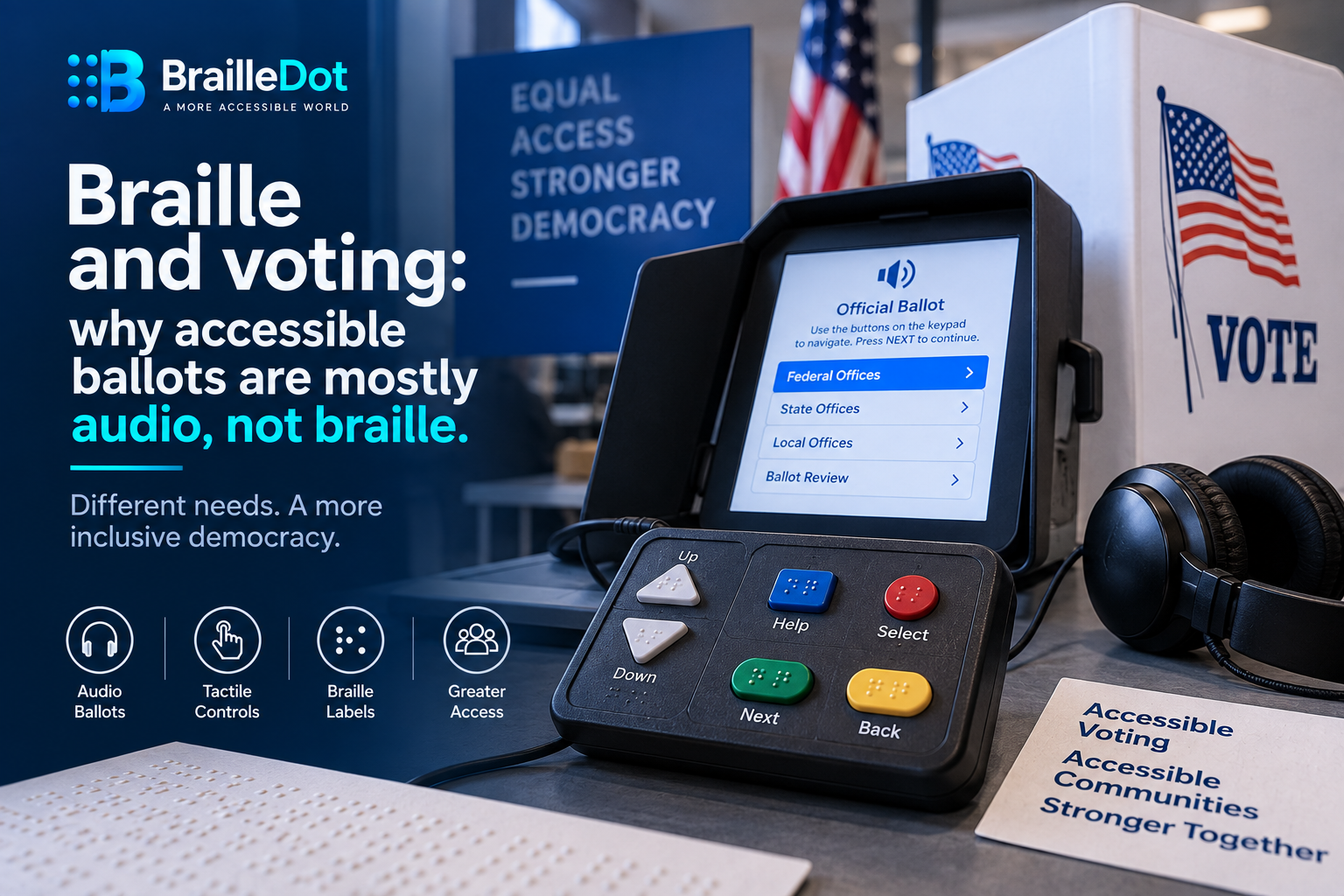
The systems built to satisfy HAVA lean heavily on audio, not braille text. A voter plugs in headphones and hears the ballot read aloud, then uses a small set of tactile, differently shaped buttons to navigate and make selections, rather than reading a braille version of the ballot itself. That design choice reflects a reality already true elsewhere in how blind people access information, braille literacy reaches a minority of people who are blind or visually impaired, while audio scales to everyone regardless of whether they ever learned to read braille. Braille still shows up, but as labeling on the physical controls rather than as the ballot’s actual content.
Specific machines make the pattern concrete. The AVC Edge system uses a handheld control box with 4 tactilely distinct buttons, a square blue Help button and a round red Select button on the right, 2 triangular Up and Down buttons on the left, plus a green Next button and a yellow Back button, each labeled in braille and each shaped and colored differently so a voter can identify them by touch alone before ever pressing one. None of that requires reading actual braille text, it requires distinguishing a small number of physically distinct controls, which is a meaningfully lower bar than braille literacy and part of why the whole system works for far more voters than a braille-text ballot alone ever could.
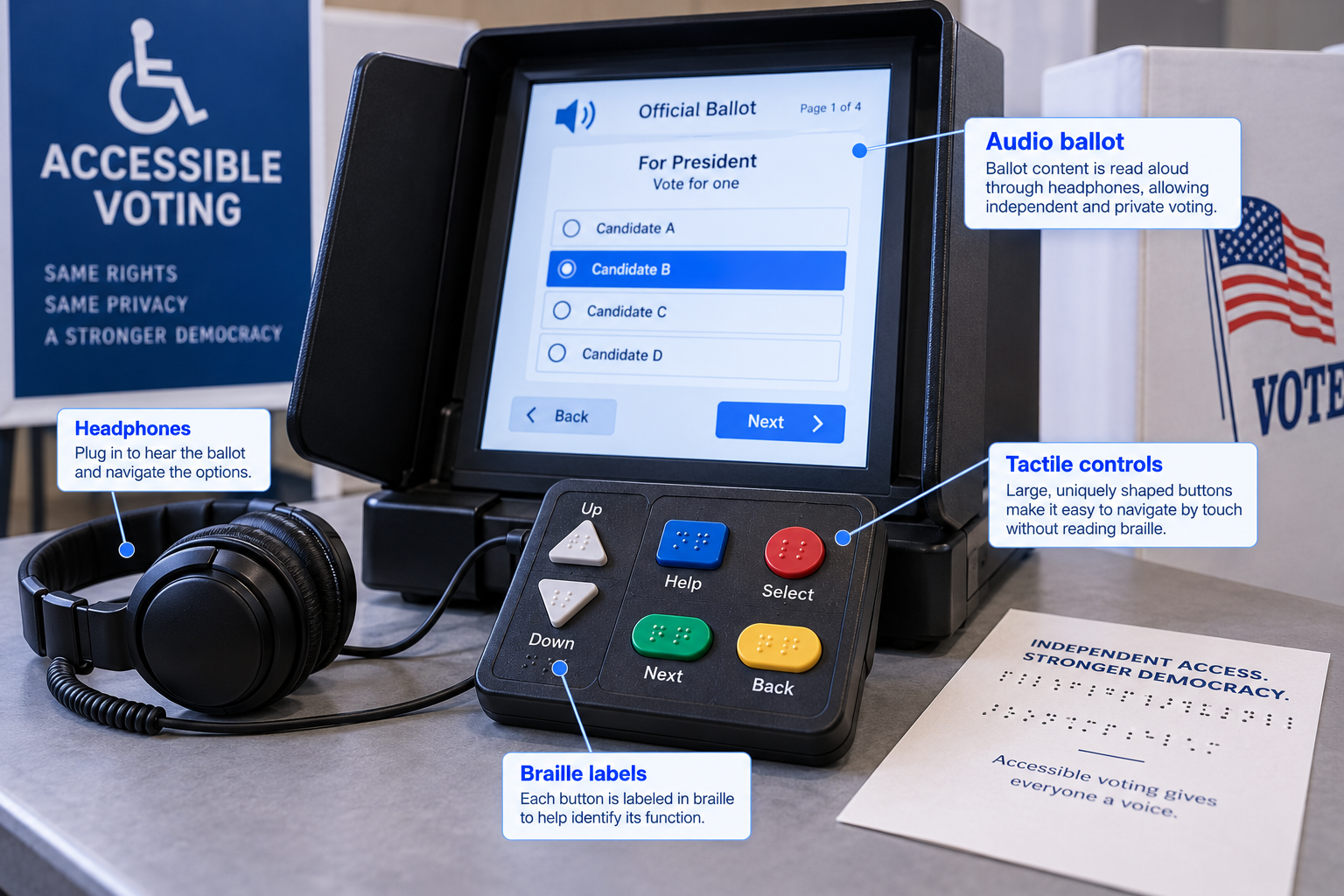
How audio-first voting equipment supports independent use
A real gap the audio-first approach doesn’t cover
This design choice, correct as it is for reaching the largest number of blind voters, leaves 1 population underserved by the standard polling-place solution. A deaf-blind voter can’t use an audio ballot, since hearing the ballot read aloud isn’t an option at all. Historically that’s meant deaf-blind voters continued relying on a family member or friend to mark their ballot for them, the exact privacy compromise HAVA was built to eliminate for other blind voters. Newer electronic ballot-delivery systems are starting to address this specific gap by letting a voter use their own personal assistive technology, including a refreshable braille display connected to a computer, the same pin-based hardware covered in our piece on how those displays work, to access and mark a ballot independently from home, work, or school rather than only at a polling place using shared equipment.
Not every accessible machine works equally well
Meeting the legal requirement and being truly usable turned out to be 2 different bars. Independent evaluations of these systems, conducted by organizations like the American Foundation for the Blind, judge machines against a specific set of criteria beyond simply having audio and braille labels present at all, whether speech is produced from real human voice recordings or synthetic text-to-speech, how clearly both the printed and spoken instructions explain the process, whether the system actively prevents undervoting or overvoting rather than just allowing it to happen silently, and whether a voter can adjust font size and screen contrast for low vision use alongside the audio option. Early testing found real, specific shortcomings even on machines that technically satisfied HAVA, in at least 1 case, braille labels were placed close enough to the buttons themselves to make the braille harder to read by touch than it should have been, a design flaw that undermines the exact feature it was meant to provide.
The push toward remote, personal-device ballot access for deaf-blind voters runs into its own separate tension. Election security concerns have grown substantially since HAVA first passed, and any system that lets a ballot be marked away from a supervised polling place raises questions election officials take seriously. Advocates for accessible voting argue that security shouldn’t be treated as an automatic trump card that overrides access entirely, since a properly secure remote system and a properly accessible one aren’t mutually exclusive goals, just 2 separate engineering problems that both need solving rather than 1 being allowed to indefinitely postpone the other.
An accessible voting machine must be usable in practice, not simply present in the polling place. Audio quality, tactile control placement, clear instructions, privacy, and trained poll workers all influence whether a voter can cast a ballot independently.
Implementation still depends heavily on the people running the polls
Having the right machine physically present doesn’t guarantee it gets used correctly. Accounts from blind voters describe real, persistent friction at the polling place itself, not with the technology but with poll workers who haven’t been adequately trained on it. One voter in Texas described finally being able to vote privately once accessible machines became available, after years of needing sighted assistance as her vision declined, and also described ongoing delays and frustration specifically because poll workers weren’t consistently prepared to operate the accessible machine when she arrived. The hardware solved 1 half of the problem. Getting every polling place staffed by someone who actually knows how to turn the accessible option on solved the other half far less consistently.
More than 2 decades in, this is progress rather than a finished job
What HAVA actually delivered was a real, legally mandated floor, at least 1 accessible machine per federal polling place, that didn’t exist before 2002 at all. What it didn’t deliver was a single, complete solution for every blind or visually impaired voter. Audio ballots reach the majority who don’t read braille. Braille-labeled tactile buttons serve the layer of navigation that still benefits from it. Deaf-blind voters are only now gaining a real independent path through personal-device ballot delivery rather than the machines sitting in polling places. More than 2 decades after the law passed, the accessible voting system in the United States is still being built out in pieces rather than having arrived as 1 finished thing.
Accessible voting requires more than a legal checkbox
Audio ballots, tactile controls, braille labels, personal assistive technology, secure systems, and properly trained poll workers all play different roles. Independent voting depends on these parts working together rather than on a single accessibility feature.