Why the same word doesn’t always contract in grade 2 braille
A word that gets its own single-cell wordsign in one sentence can end up spelled out letter by letter in another, depending on exactly where it sits in the text. Grade 2 contractions aren’t a flat lookup table applying the same cell to a word every time it appears. The engine behind this translator checks a specific set of conditions before it will apply a whole-word contraction at all, and follows a fixed priority order to decide which kind of contraction wins if more than 1 could technically apply. This is traced directly from the translation engine’s own logic, not a general description of how grade 2 is supposed to work.
The engine first checks whether the word qualifies for a whole-word contraction and which category has priority.
If no whole-word contraction applies, it checks part-word contractions before falling back to ordinary letters.
A word has to stand alone first
Before any whole-word contraction, a short form, an alphabetic wordsign, a strong wordsign, or a lower wordsign, can apply, the word has to qualify as standing alone. That means it has to be preceded by a space or the start of the text, and followed by a space, a punctuation mark, or the end of the text. This is a looser requirement than it might sound. Punctuation immediately after a word still counts as standing alone for this general check, a word followed directly by a comma or a period is still eligible for these contractions. Our grade 2 contractions reference lists every contraction this translator implements. This page is about when those contractions are actually allowed to fire, which turns out to be more specific than a simple word match.
When more than 1 contraction could apply, the order is fixed
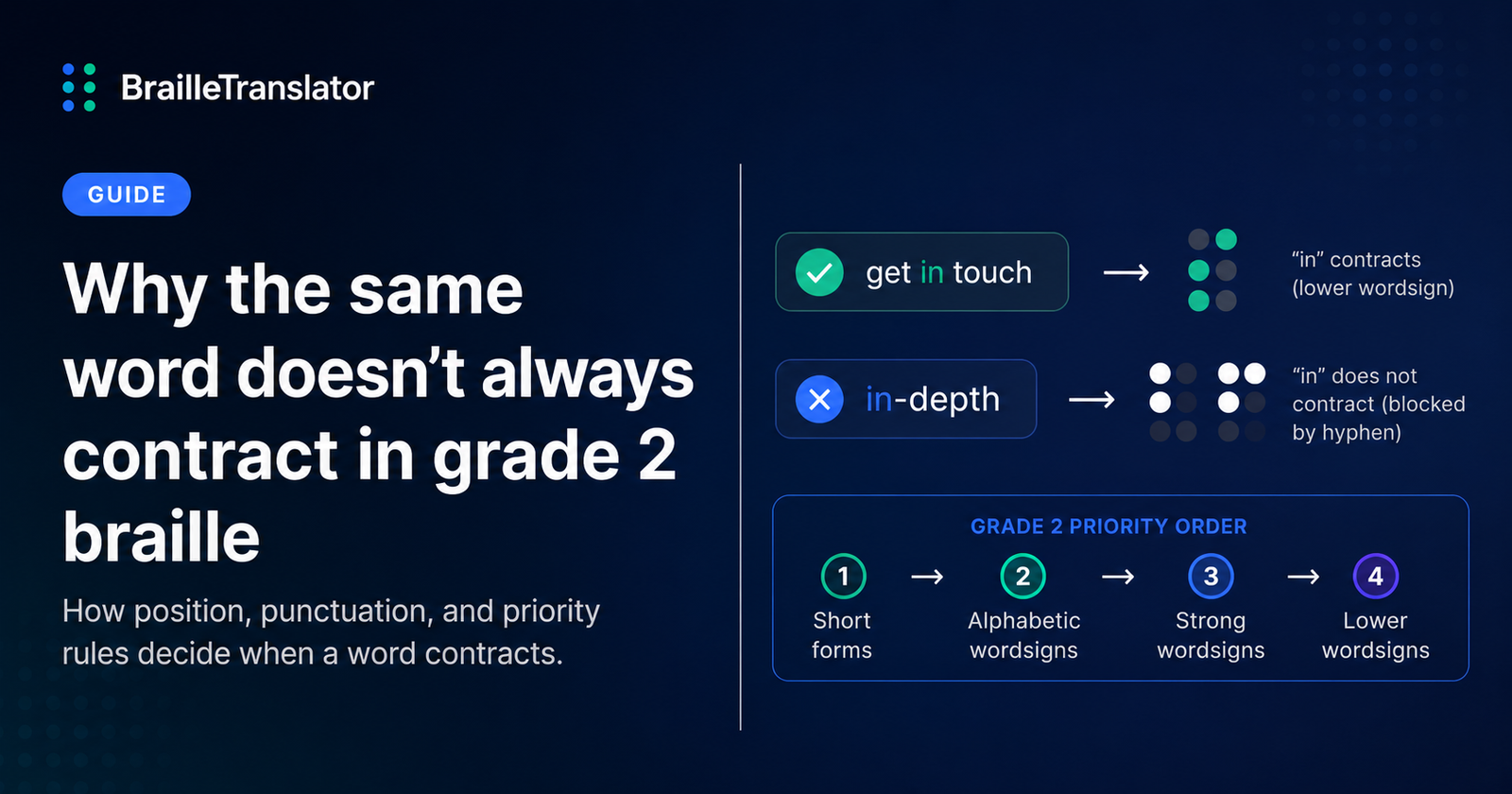
Some words could theoretically qualify for more than 1 kind of whole-word contraction depending on how the categories are checked. The engine resolves this with a strict, fixed order rather than leaving it ambiguous. Short form words are checked first. If a word doesn’t match a short form, alphabetic wordsigns are checked next. After that, strong wordsigns. Lower wordsigns are checked last, and only if a separate condition, covered below, allows it. That order never changes, it’s not decided per word or per sentence, it’s built into the structure of the translation engine itself.
This priority order also has to work correctly alongside capitalization, and it does. A capitalized wordsign like “But” produces a single capital indicator followed by the ordinary wordsign cell, and a fully capitalized word like “BUT” produces the word-level capital signal, the same indicator cell used twice in a row, followed by that same wordsign cell, both confirmed directly in this translator’s own test cases. Capitalization is resolved as a separate layer on top of whichever contraction category wins, rather than interfering with the priority order itself.
Lower wordsigns have an extra rule the others don’t
Be, enough, were, his, in, and was are lower wordsigns, and they carry a restriction none of the other contraction categories have. Even when a lower wordsign word technically stands alone by the general rule above, it specifically cannot take its single-cell form if a hyphen, comma, period, semicolon, colon, question mark, exclamation point, apostrophe, or quotation mark sits directly against it with no space in between. Short form words, alphabetic wordsigns, and strong wordsigns don’t carry this extra restriction, it applies only to this 1 category.
Why “in” changes inside “in-depth”
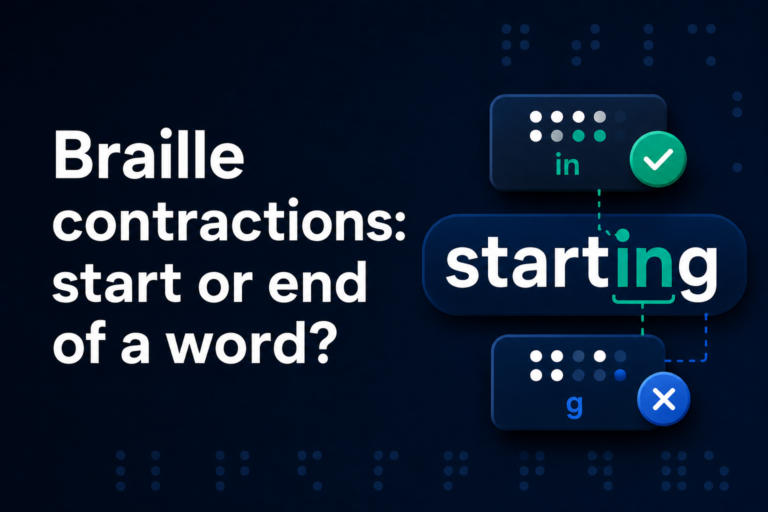
“in” stands alone with spaces around it, so the lower wordsign rule can apply.
“in” is directly followed by a hyphen, which blocks the lower wordsign treatment.
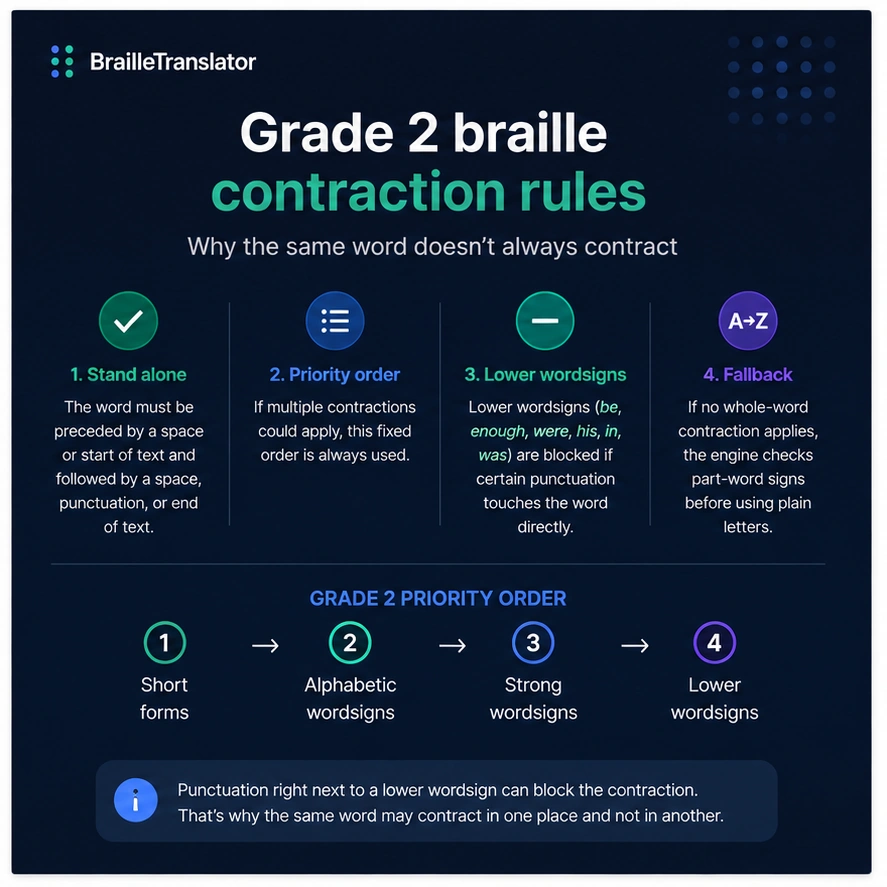
Tracing this through with a concrete case makes it clear. The word “in” standing alone with spaces on both sides, as in “get in touch,” qualifies fully, general standalone check passes, no forbidden punctuation touches it, so it gets its single lower wordsign cell. The word “in” inside “in-depth” is a different story. It’s immediately followed by a hyphen with no space, and a hyphen is on the specific list of punctuation marks that blocks a lower wordsign. The general standing-alone check still technically passes, since punctuation counts toward that looser rule, but the lower-wordsign-specific check fails. “In” loses its single-cell treatment entirely in that position and falls through to being spelled out letter by letter instead.
The same pattern holds for the others in this category. “Was” standing alone at the end of a sentence, as in “that’s how it was,” qualifies normally. “Was” immediately followed by a comma with no space, as in an unusual construction like “it was,quite honestly, unexpected,” would specifically lose the lower wordsign treatment for that occurrence, purely because of the punctuation sitting directly against it, not because of anything about the sentence’s meaning. The likely reasoning, based on how the rule is structured, is that a word touching punctuation with no space reads more like part of a compound term or a formatting artifact than an isolated short word, and collapsing it into a 1-cell wordsign in that position would misrepresent how tightly it’s bound to what’s next to it.
What happens when nothing whole-word qualifies
If a word doesn’t stand alone, or it’s a lower wordsign blocked by adjacent punctuation, or it simply doesn’t match any whole-word contraction category at all, the engine doesn’t just spell it out immediately. It moves on to checking for part-word contractions instead, groupsigns and letter-group signs that can apply inside a word regardless of whether the whole word itself qualified for a wordsign. Only if nothing at any level matches does a word end up rendered purely letter by letter. That fallback structure, whole-word contractions first, then part-word contractions, then plain letters as the last resort, is what makes the engine’s output consistent rather than arbitrary, even in edge cases like a lower wordsign sitting against a hyphen.
See the difference yourself
Type “get in touch” and “in-depth analysis” into our braille translator in grade 2 mode and compare how “in” is rendered in each, a direct, checkable example of this exact rule in action.
Open the translatorFrequently asked questions
Grade 2 contractions depend on where a word sits in the text, not just what the word is. Whether it stands alone, what touches it, and which contraction category takes priority can all change how the same word is rendered from one sentence to another.
It means the word is preceded by a space or the start of the text, and followed by a space, a punctuation mark, or the end of the text. This is required before most whole-word contractions can apply.
Short form words are checked first, then alphabetic wordsigns, then strong wordsigns, then lower wordsigns last. This order is fixed in the translation engine and doesn’t change based on context.
No. Only lower wordsigns, be, enough, were, his, in, and was, are blocked when a hyphen or certain punctuation marks touch them directly with no space. Short form words, alphabetic wordsigns, and strong wordsigns don’t carry this restriction.
The engine checks for part-word contractions, groupsigns that can apply inside the word, before falling back to spelling it out letter by letter as a last resort.