How to read braille dots: the six dot cell explained
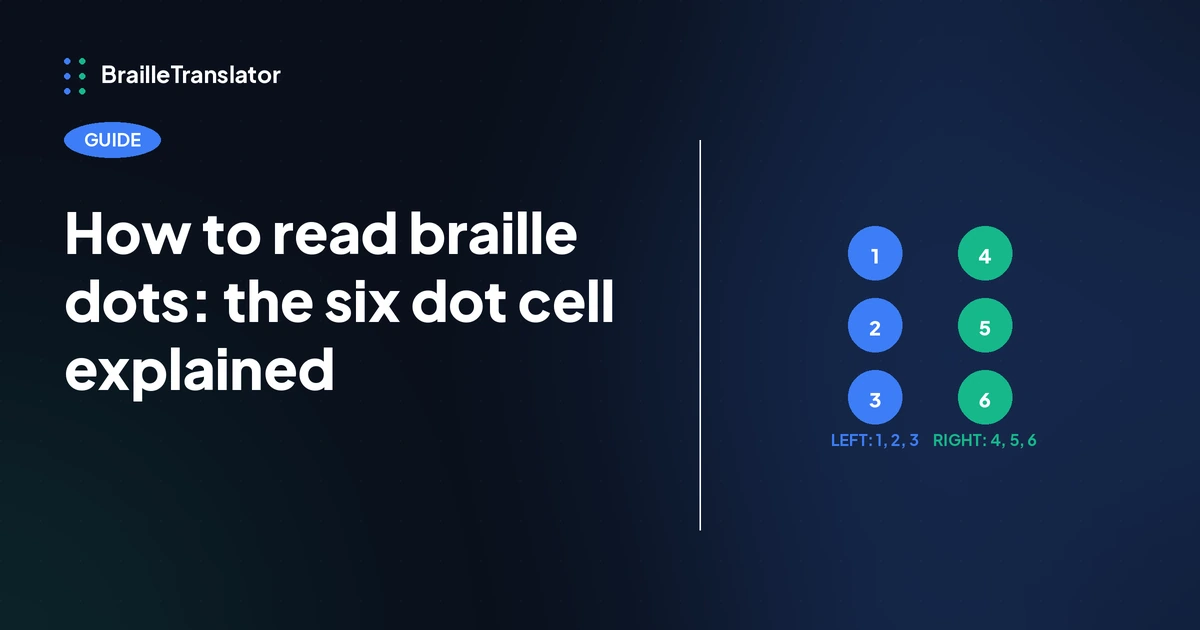
Every braille character is built from a cell of up to six raised dots, arranged in 2 columns of 3. Dots are numbered 1, 2, 3 down the left column, top to bottom, and 4, 5, 6 down the right column, top to bottom. A single raised dot in position 1 is the letter a. Add dot 2 and it becomes b. Every letter, number, and punctuation mark in braille is some combination of these same six positions, which is what this guide walks through.
The six dot cell structure
A braille cell is fixed at 2 columns and 3 rows, 6 possible dot positions total. That layout isn’t arbitrary. Six positions give 63 possible combinations of raised dots (every combination except leaving the cell blank), which is enough to cover the full alphabet, all 10 digits, and standard punctuation within single cells, with additional multi-cell combinations available for anything that needs more than that.
The dot numbering is fixed and doesn’t change based on what character you’re reading. Dot 1 is always top left, dot 2 middle left, dot 3 bottom left, dot 4 top right, dot 5 middle right, dot 6 bottom right. Once that numbering is familiar, reading any single cell becomes a matter of identifying which of those 6 positions are raised.
The braille alphabet, how letters build from dot combinations
The 26 letters aren’t a random assignment of dot patterns. They build in 3 groups of 10, each group reusing the same base shapes with dots added.
Letters a through j use only the top 4 positions, dots 1, 2, 4, and 5. Dot 3 and dot 6 are never raised in this first group.
Letters k through t are the exact same 10 shapes as a through j, with dot 3 added to each one. K is a plus dot 3. L is b plus dot 3, and so on through t.
Letters u through z, with one exception, are again the same base shapes as a through e, this time with both dots 3 and 6 added. U is a plus dots 3 and 6. V is b plus dots 3 and 6.
The exception is w. Because the braille system predates the letter w having a standard place in the French alphabet it was originally built for, w doesn’t follow the pattern the other letters in its group follow. It has its own distinct shape, dots 2, 4, 5, and 6.
Numbers use the same shapes as letters a through j
Braille doesn’t have a separate set of 10 shapes for digits. Numbers 1 through 9 and 0 use the exact same dot patterns as letters a through j, in the same order: the shape for a doubles as 1, the shape for b doubles as 2, and so on through j, which doubles as 0.
dots 3-4-5-6
read as digit 1
What tells a reader whether a given shape means a letter or a number is a separate signal placed before it, a number indicator, a distinct cell using dots 3, 4, 5, and 6 together. Everything following that indicator is read as digits using the a through j shapes, until something signals a return to letters.
Capital letters need their own signal too
The alphabet shapes themselves don’t distinguish uppercase from lowercase. A single letter is capitalized by placing a capital indicator, a cell with just dot 6 raised, directly before it. Capitalizing an entire word uses that same dot 6 shape twice in a row before the word, signaling that the capitalization applies across the whole word rather than just the next letter.
Both of these are separate cells from the letter itself, not a modification to the letter’s own dot pattern. The letter a always stays a single dot in position 1, whether it’s capitalized or not. What changes is what comes before it.
This covers the base alphabet, not contractions
Everything in this guide is grade 1 braille, meaning every character gets its own cell with no shortcuts. This is the layer you need to actually read individual dot patterns and understand what a cell means on its own.
Grade 2 braille adds a separate layer on top of this same alphabet, where certain cells and cell sequences stand in for whole words or common letter groups depending on where they appear in a word, rather than spelling everything out letter by letter. That’s a meaningfully different topic from reading individual dots, and it’s covered in full in our grade 1 vs grade 2 braille guide, including which grade fits which situation.
This guide also doesn’t cover punctuation, commas, quotation marks, currency symbols, which follow their own dot patterns. Our braille punctuation reference covers that separately.
Numbers get their own dedicated explainer too, including the details this overview only touches on. See how braille numbers actually work for multi-digit sequences, decimals, and the letter indicator.
Try it yourself
Once the dot positions and numbering make sense, the fastest way to see them in action is typing a word and watching which cells get produced. Our braille translator shows the dot pattern for anything you type, letter by letter, which is a useful way to check your own reading against a source you can trust.
Open the translatorFrequently asked questions
A braille cell has up to 6 dot positions, arranged in 2 columns of 3. Not every character raises all 6, most use only some of the positions.
Dots 1, 2, 3 run down the left column from top to bottom. Dots 4, 5, 6 run down the right column from top to bottom.
No. Digits 1 through 9 and 0 use the same dot patterns as letters a through j. A separate number indicator cell placed beforehand signals that the following shapes should be read as digits rather than letters.
A capital indicator, a cell with dot 6 alone, is placed directly before the letter to capitalize just that letter. That same shape used twice in a row capitalizes an entire word.
No. This guide covers grade 1, the base alphabet where every character has its own cell. Grade 2 adds contractions on top of this same alphabet, where certain cells stand in for whole words or letter groups instead.