How braille numbers actually work in UEB
How braille numbers actually work in UEB
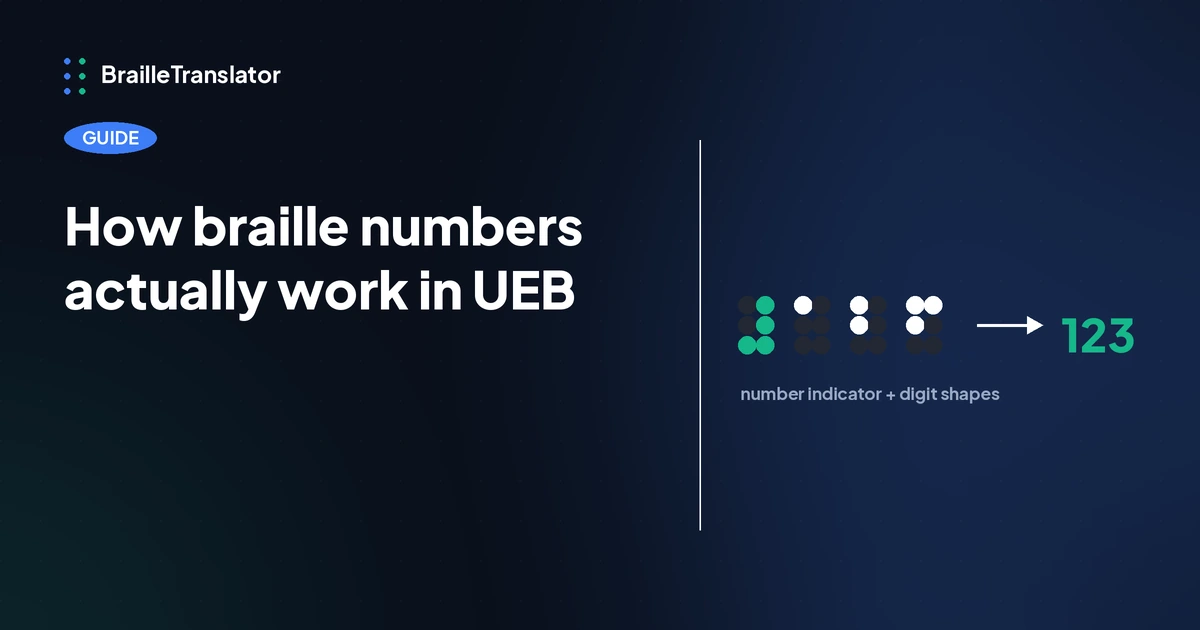
Numbers in UEB don’t have their own dot patterns. They reuse the exact same 10 shapes as the letters a through j, and a separate signal cell tells the reader whether what follows should be read as digits or letters. That single design choice explains almost everything else about how braille handles numbers: how multi-digit numbers stay unambiguous, how a decimal point avoids getting confused with a sentence period, and how the code switches cleanly back to letters the moment a number ends. This tool implements every part of that system, verified directly against the actual number-handling logic rather than assumed from how UEB numbers generally work.
Numbers borrow the alphabet, they don’t replace it
A number indicator, a cell using dots 3, 4, 5, and 6 together, is placed directly before a digit sequence. Everything that follows is read as digits using the a through j shapes until something signals otherwise. Our guide to reading braille dots covers this basic mechanic. What that post doesn’t cover, and what actually matters once you’re transcribing anything longer than a single number, is what happens inside a multi-digit sequence and how the system knows when to stop.
Multi-digit numbers, decimals, and thousands separators
A plain multi-digit number is straightforward, 1 number indicator, then each digit’s own shape in sequence. The number 123 becomes the number indicator followed by the shapes for 1, 2, and 3, with no repeated indicators between digits.
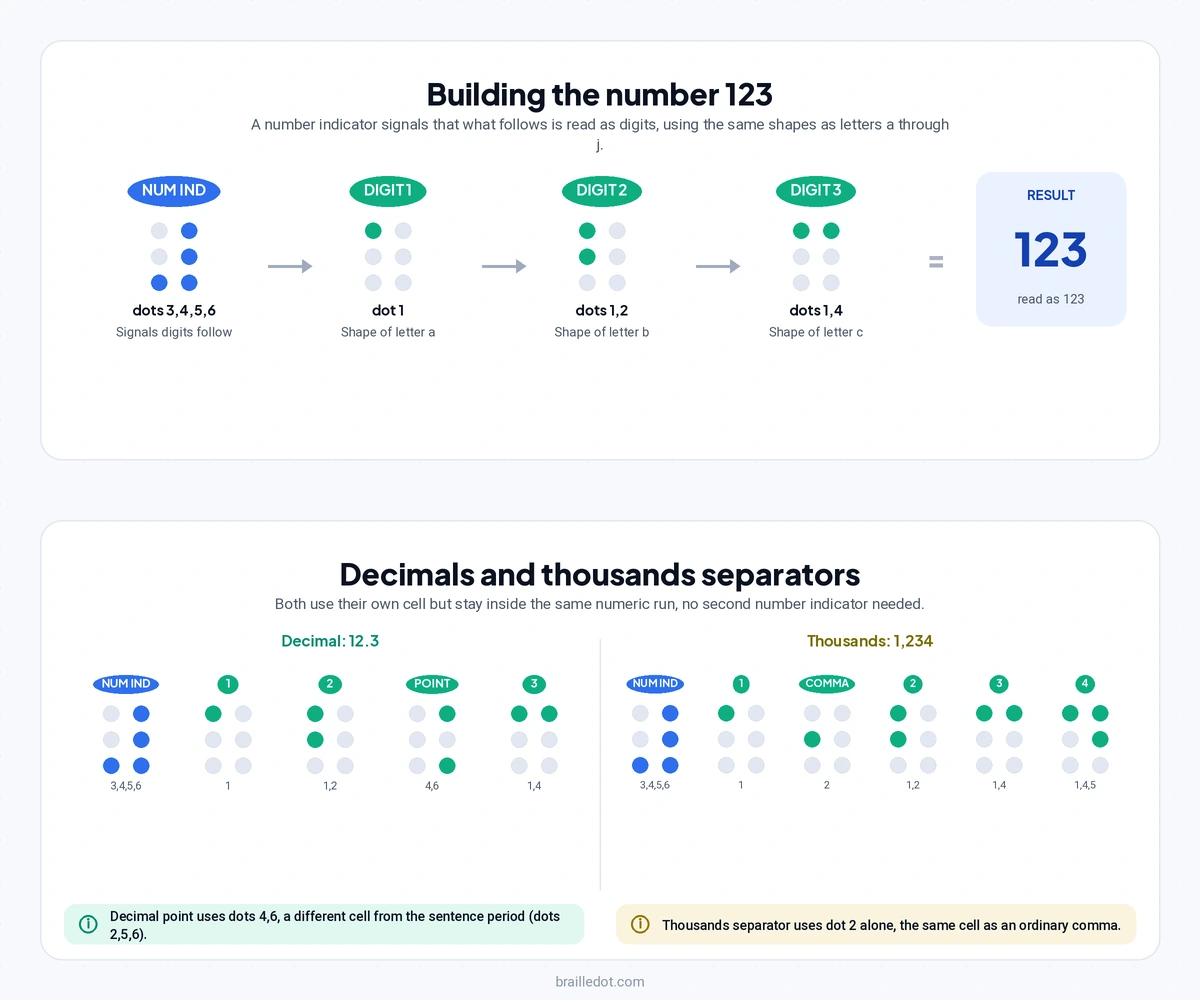
Decimals and thousands separators both stay inside that same numeric sequence without needing a second number indicator, but they use different cells to do it, and the two shouldn’t be confused with each other. A decimal point uses dots 4 and 6, a completely different cell from the period that ends a sentence, which uses dots 2, 5, and 6, covered in our braille punctuation guide. The number 12.3 translates as the number indicator, digit 1, digit 2, the decimal-specific cell, then digit 3, confirmed directly against this translator’s own test cases. A thousands separator comma, by contrast, reuses the exact same cell as an ordinary comma, dot 2 alone, since there’s no separate numeric comma shape, only a rule that keeps numeric mode active across it. The number 1,234 becomes the number indicator, digit 1, the comma cell, then digits 2, 3, and 4, all within one continuous numeric run.
That distinction matters for anyone transcribing by hand. Seeing a period inside a number should never produce the same cell you’d use to end a sentence, and mixing the two up is a genuine, easy-to-make error, not a stylistic choice.
Getting back to letters, and the signal that does double duty
At some point a digit sequence ends, and often it ends by running directly into a letter with no space between them, phone extensions, apartment numbers, things like 9am or a seat number like 4B. Without a separate signal, the letter immediately after a digit would be misread as digit continuation, since letters and digits share the same shapes. UEB solves this with a dedicated letter indicator, dots 5 and 6, placed directly before that letter to force it to be read as a letter rather than another digit.
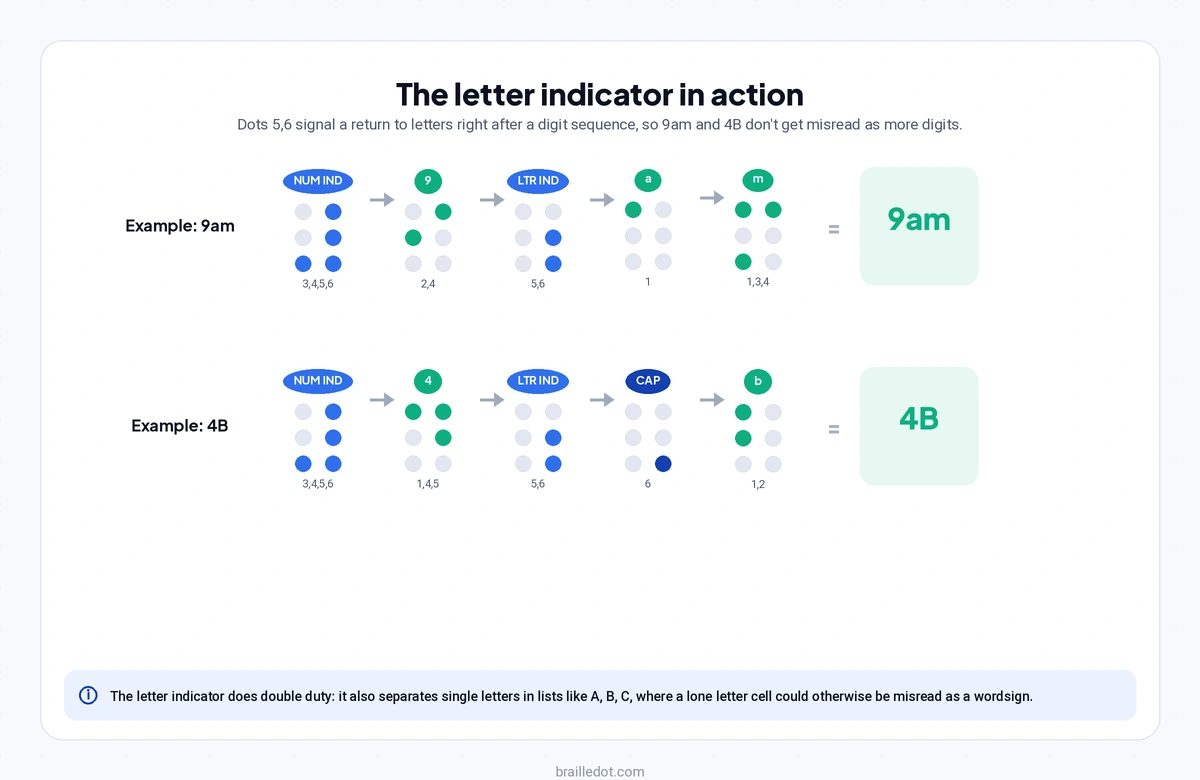
This tool applies that rule precisely. 9am translates to the number indicator, the digit 9 shape, the letter indicator, then the letter a and the letter m shapes, confirmed against the engine’s own test suite. When the letter that follows happens to be capitalized, both signals stack, the letter indicator first, then the ordinary capital letter indicator, then the letter itself. 4B translates as the number indicator, digit 4, the letter indicator, the capital indicator, then the letter b shape, also a directly tested case in this tool’s code, not an assumption about how capitalization and digit transitions ought to interact.
What’s genuinely worth knowing is that this same letter indicator cell does a second, unrelated job elsewhere in the system. A single standalone letter sitting next to another single letter in a comma-separated list, something like A, B, C, creates its own ambiguity problem, since a lone letter like b uses the identical cell as the wordsign for “but,” covered in our grade 2 contractions reference. Written alone in a list, that cell could be misread as the word “but” instead of the letter b. This translator checks specifically for that pattern, a single letter directly adjacent to another single letter with a comma and space between them, and inserts the same letter indicator cell there too, for a completely different reason than the digit case. 1 signal, 2 separate ambiguity problems it exists to solve.
Numbers don’t change between grade 1 and grade 2
This is confirmed directly in the translation engine’s own code, which explicitly reuses identical number-handling logic for grade 2 as it does for grade 1, digit for digit, indicator for indicator. That’s not a shortcut in this particular implementation, it reflects how UEB itself works. Contractions apply to letters and words, not to digits. A number never gets shortened or contracted the way “about” or “stand” would be in grade 2 text, covered in our grade 1 vs grade 2 guide. Whichever grade the surrounding text is written in, the numbers inside it follow exactly the same rules.
Where UEB numbers stop and Nemeth begins
Everything covered here, digit sequences, decimals, thousands separators, and the transition back to letters, is everyday numeric content embedded in ordinary text: prices, dates, addresses, quantities. UEB handles all of it correctly on its own, and this tool translates all of it accurately. What UEB’s number system isn’t built for is full mathematical notation, fractions, exponents, equations, chemistry formulas, that’s a fundamentally different problem requiring its own dedicated system, covered in our Nemeth code guide. Knowing where that line sits matters if you’re transcribing anything more complex than numbers appearing inside prose.
Try it with your own numbers
Type a number with a decimal point, a thousands separator, or a digit sitting right next to a letter into our braille translator and check the individual cells against what’s described here.
Open the translatorFrequently asked questions
No. Numbers reuse the same 10 shapes as the letters a through j. A number indicator cell placed before a digit sequence signals that what follows should be read as digits rather than letters.
No. A decimal point inside a number uses a dedicated cell, dots 4 and 6, completely different from the cell used for a period that ends a sentence, which uses dots 2, 5, and 6.
A letter indicator cell, dots 5 and 6, is inserted directly before the letter to signal that it should be read as a letter rather than a continuation of the digit sequence.
No. Numbers follow identical rules in both grade 1 and grade 2. Contractions in grade 2 apply to letters and words, not to digits, so a number reads the same regardless of which grade the surrounding text uses.
No. UEB’s number system covers everyday numeric content like prices, dates, and quantities. Full mathematical notation, including fractions and equations, is handled by Nemeth code, a separate system used alongside UEB.