
Lesson 11: Practice Six-Key Braille Typing
Watch Lesson 11: Practice Six-Key Braille Typing
Watch the guided demonstration, pause to practise, then continue with the written lesson and exercises below.
If you already know that c uses dots 1 and 4, you know what a six-key Braille keyboard needs you to do: press the keys for dots 1 and 4 together. One simultaneous keypress produces one Braille cell.
This is the main idea behind six-key entry. You have spent ten lessons recognizing and arranging Braille signs, most recently reading complete sentences. Now you can translate that dot knowledge into a repeatable hand movement. The skill is about forming cells; a broader guide to computer setup and different input systems serves a different purpose.
Why six keys form one Braille cell
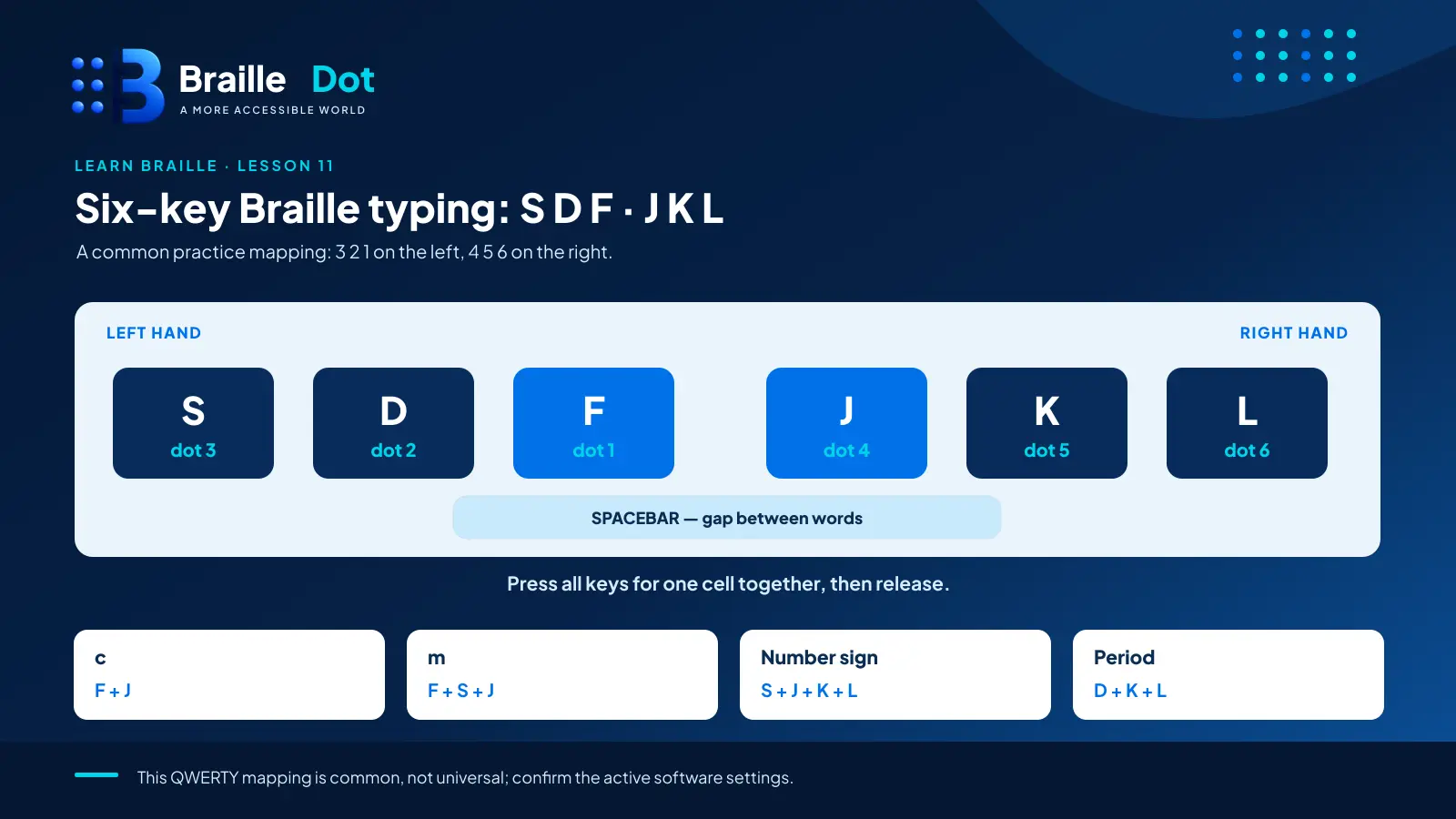
A traditional six-dot Braille cell has two columns of three dots. A six-key keyboard places the input keys in a row so your fingers can select several dots at once. The order of the keys is usually:
Left hand: 3, 2, 1 | Right hand: 4, 5, 6
That is a writing-key layout, not a diagram of the two-column cell. Perkins-style keyboards use this left-to-right arrangement. The spacebar normally sits beneath the dot keys and makes a word gap when used by itself.
For six-key entry on an ordinary QWERTY keyboard, one common mapping is S D F J K L. Here it is with the dot numbers made explicit:
| Left-hand key | Dot | Right-hand key | Dot |
|---|---|---|---|
| S | 3 | J | 4 |
| D | 2 | K | 5 |
| F | 1 | L | 6 |
Rest your left ring finger on S, middle finger on D, and index finger on F. On the right, use index J, middle K, and ring L. Keep your thumbs available for the spacebar.
This is a practice layout, not a claim that every device or input program uses the same letters. Confirm its dot-to-key assignment before beginning a real typing session. The Braille dot numbers themselves do not change.
Turn a dot pattern into a keypress
Let’s form a, c, m and h using the mapping above.
| Braille letter | Dot numbers | Keys to press together |
|---|---|---|
| a — ⠁ | 1 | F |
| c — ⠉ | 1-4 | F + J |
| m — ⠍ | 1-3-4 | F + S + J |
| h — ⠓ | 1-2-5 | F + D + K |
Each row takes a single entry action. For c, do not press F, release it, then press J as though you were typing two ordinary letters. Press F and J at the same time, then release them. This makes one cell with both required dots.
A first word with three cell entries
Write fin with three separate six-key presses:
- f: F + D + J → ⠋
- i: D + J → ⠊
- n: F + S + J + K → ⠝
Together the three cells read ⠋⠊⠝. No space is required between the letters. Press the spacebar once after a complete word when the next word begins.
Notice the rhythm: choose the dots, press together, release, then move to the next cell. Slow and correct is the target. Speed will come from consistent recognition and movement.
Indicators also have dot-key patterns
Six-key entry is not limited to alphabet letters. The capital indicator ⠠ is dot 6, so it uses L. The numeric indicator ⠼ has dots 3-4-5-6, so it uses S + J + K + L.
The period ⠲ uses dots 2-5-6: press D + K + L together.
To enter 23, make three cells:
- Numeric indicator: S + J + K + L → ⠼
- Digit 2 uses the b cell: F + D → ⠃
- Digit 3 uses the c cell: F + J → ⠉
You should see ⠼⠃⠉. The number has one numeric indicator at its beginning, not a new one before each digit.
For capitalized names, enter the capital indicator first, then the appropriate letter and the rest of the name. A six-key keyboard does not have to invent a different raised-dot pattern for an uppercase letter.
Decode these finger combinations
Without looking at the table, write the Braille letter made by each set of simultaneously pressed keys. You can tap them on a suitable six-key entry surface or work them out on paper using dot numbers.
| # | Keys pressed at once | Letter |
|---|---|---|
| 1 | F + K | ______ |
| 2 | F + D + S + J + K | ______ |
| 3 | F + S + L | ______ |
| 4 | D + S + J | ______ |
| 5 | F + S + J + L | ______ |
| 6 | F + D + S + K | ______ |
Reveal the six letter/chord answers
- e — dots 1-5 → ⠑
- q — dots 1-2-3-4-5 → ⠟
- u — dots 1-3-6 → ⠥
- s — dots 2-3-4 → ⠎
- x — dots 1-3-4-6 → ⠭
- r — dots 1-2-3-5 → ⠗
If you got one wrong, identify the key-to-dot mapping before repeating that combination. Do not simply memorize the answer from its keyboard shape.
Type two words that were not demonstrated
Write each word as a sequence of simultaneous keypresses, one chord per cell:
A. joy — Your keys: __________________
B. pug — Your keys: __________________
Reveal the correct strokes
joy = ⠚⠕⠽
- j: D + K + L
- o: F + S + K
- y: F + S + J + K + L
pug = ⠏⠥⠛
- p: F + D + S + J
- u: F + S + L
- g: F + D + J + K
Check that each combination is pressed together, followed by a release, and that there is no word space between letters.
Practice without racing the clock
For your next short session, choose three new words and work through them deliberately. Say the dot numbers first, position your fingers, make the cell, then inspect the resulting character. If you type on an ordinary keyboard, use software that actually supports simultaneous six-key Braille input; ordinary text entry interprets those keys as normal letters.
If a suitable input surface is not at hand, write a sequence of dot numbers and keys in a notebook. The dot-plan exercise still checks your understanding, even though physical coordination is a separate part of learning. When a typed sequence is ready, compare its Braille cells with an independently prepared line from the BrailleDot translator.
Practical reference: Perkins School for the Blind, Writing With a Braille Display.
Written by Marcus Wren.